
In this post we will be going through creating a HTML report for Microsoft Entra ID App registration to export a list of expired and expiring client secrets and certificates.
I wanted to create a HTML report that would highlight cert / secrets that where expired or due to expire and make it quicker to check what is due to expire.
This report will use the existing PowerShell script I created last year to export Azure App registration details to a CSV file, just updated to use an embedded CSS style sheet to format the html output.
First I needed to create a HTML style sheet, below is the HTML code I use for the HMTL formatting.
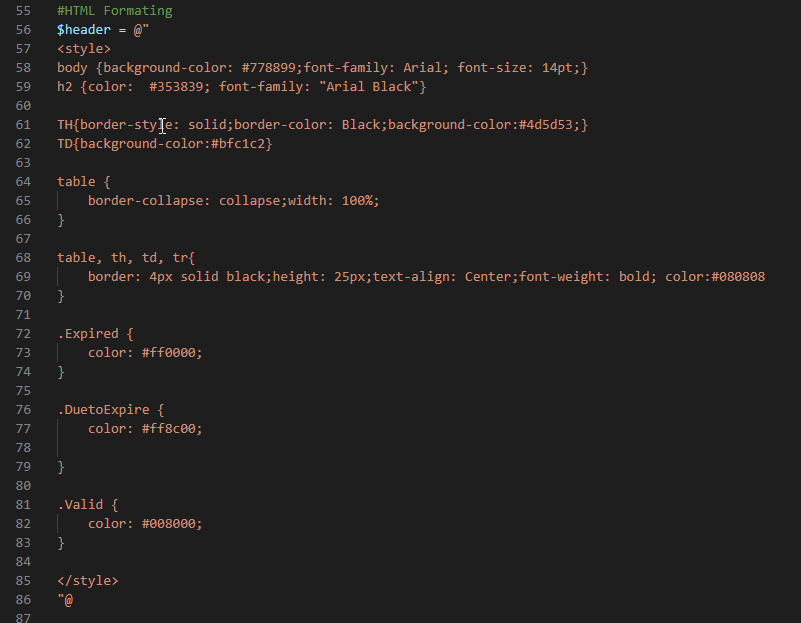
The last step was update the rows to set each row to green, orange or red depending on the status of the cert / secret.

To run the script I will be using a certificate and app registration as this allow for better automation and certificate are recommend over client secrets for security. If you need to know how to set this up I have done a previous post on this.
.\Get-AppRegistrationdetailsHTMLv2.ps1 -CertificateThumbprint thumbprint -ClientId ClientID -TenantId TenantID -ReportExport C:\temp\Graph\ -ExpiryDate 200

Below is an example of the full export.
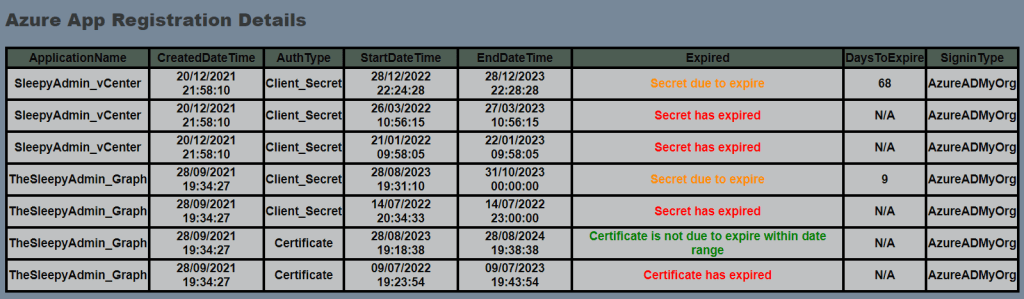
The table and colors can be modified just have to update the style sheet.
To download the full script use the below GitHub link.
 TheSleepyAdmins